Visual Maker AI
Sign in

THE PERSONAL STYLE STUDIO NEW

ChatGPT Sweater
Trend

Black and white. One bold sweater.
Still you.

Upload a selfie or a photo of your pet, pick a sweater color, and get the color pop studio portrait everyone is posting. No prompt to copy, no editing skills needed.

Your face stays yoursWorks with cats and dogs too 🐾Cost shown first
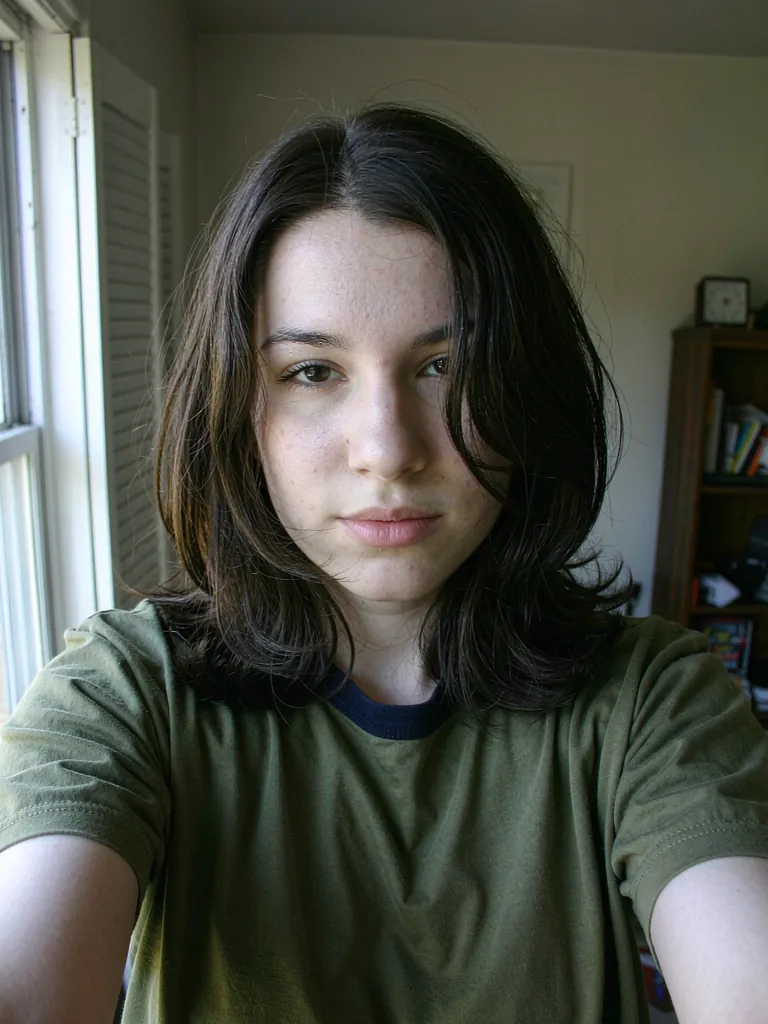
AI-generated adult portrait before the color pop sweater editTHE ORIGINAL
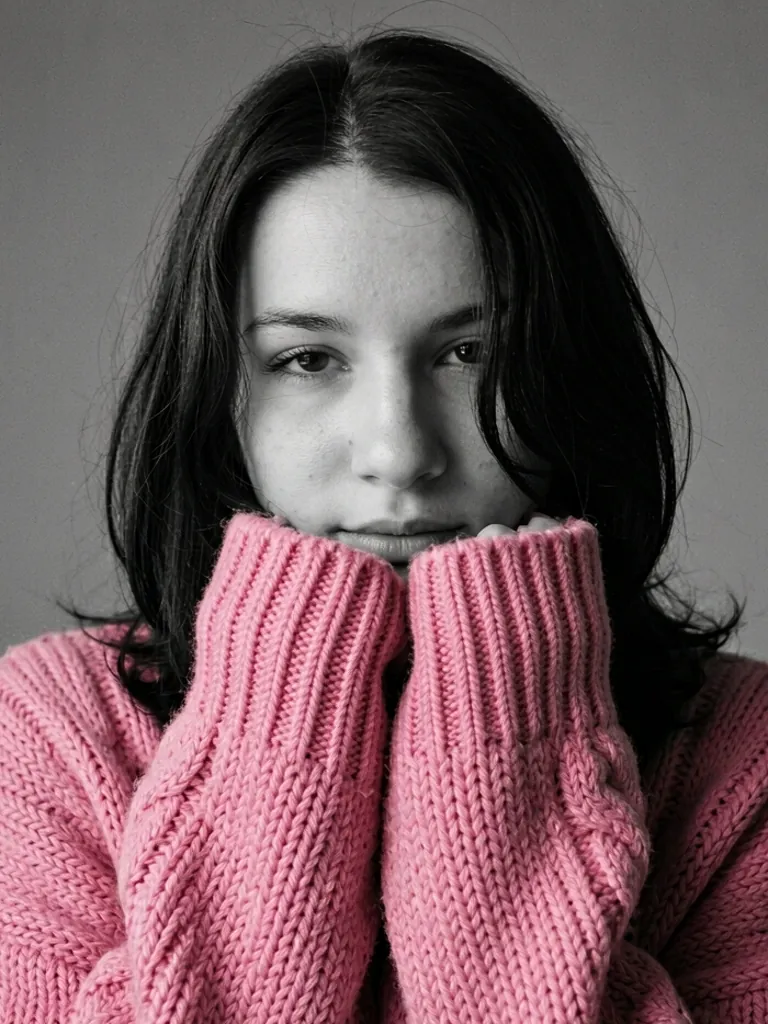
Same AI-generated adult in a black and white studio portrait with a bubblegum pink sweater covering the mouthYOUR NEXT PORTRAIT ↗
One sweater.
Every mood.
Loading your sweater studio…

SAME FACE. NEW SHADE.

One sweater. Every mood.

Original AI-generated examples, edited with our image model. Drag to compare.

Black and white portrait with a bubblegum pink oversized sweater covering the mouthBefore: original portraitBEFOREAFTER
Bubblegum Pink

Soft, playful, made for your feed.

Black and white portrait with a cherry red oversized sweater covering the mouthBefore: original portraitBEFOREAFTER
Cherry Red

Classic cozy with a little drama.

Black and white portrait with a cobalt blue oversized sweater covering the mouthBefore: original portraitBEFOREAFTER
Cobalt Blue

Cool, calm, quietly striking.

Black and white dog portrait wearing a sunshine yellow knit sweater with a rolled collarBefore: original portraitBEFOREAFTER
Pet edition: Sunshine Yellow

Your dog, wrapped in knit sunshine.

Black and white cat portrait wearing a kelly green knit sweater with a rolled collarBefore: original portraitBEFOREAFTER
Pet edition: Kelly Green

Cat in a turtleneck. Enough said.

THE PROCESS

Three steps. All yours.

  1. 01

    Upload your photo

    Choose a clear, well-lit selfie or a photo of your pet with the face visible. Front-facing, chest-up shots work best.

  2. 02

    Pick your pop of color

    Choose Person or Pet, then one of eight sweater colors or your own custom shade. Pick a format for your feed. Check the credit cost.

  3. 03

    Download and share

    Compare before and after, download your portrait, or try another color with the same photo.

What is the ChatGPT sweater trend?

The ChatGPT sweater trend is the portrait style taking over TikTok right now: a moody black and white studio photo where the only thing in color is a huge, chunky-knit sweater. The sleeves are pulled up over the mouth, the eyes look straight into the camera, and the single pop of pink, red, yellow or blue does all the talking. Creators post the same selfie in several colors side by side, and the “same girl, different colors” grid has become a format of its own.

The trend got its name because people first made it by pasting a long prompt into ChatGPT or Gemini. That works, but it takes trial and error. You need the right wording to keep the background gray, to stop the model from coloring your skin or lips, and to keep your face looking like you. One wrong word and you get a full-color photo or a stranger’s face.

Visual Maker AI turns that prompt into a one-click tool. You upload a photo, pick a color and a format, and our image model applies a tested recipe: a grayscale studio backdrop, soft editorial lighting, an oversized cable-knit sweater in your chosen shade, long sleeves covering the lower face and both eyes visible. Everything except the sweater stays black and white, so the color really pops.

Why the color pop look works

Selective color is an old photography trick. When everything in a frame is gray except one object, the eye goes straight to it. Here, that object is a soft, oversized sweater, and the covered mouth adds a little mystery, so the whole expression lives in your eyes. It feels cozy and editorial at the same time, which is why it fits winter feeds, profile pictures and holiday posts so well.

Color choice changes the mood. Bubblegum pink reads playful, cherry red feels classic and a little dramatic, cobalt blue is calm and striking, sunshine yellow and tangerine are pure energy, while lavender and baby blue feel dreamy. If none of the presets match your style, open Custom and enter any shade you like.

Bring your pet into the trend

Your cat or dog can join in. Switch the generator to Pet, upload a clear photo where your pet’s face is visible, and choose a color. Instead of sleeves, pets get a cozy chunky-knit sweater with a tall rolled collar that tucks up over the chin and muzzle, like a snug scarf, so their eyes do all the work. The model keeps your pet’s breed look, fur pattern and markings, so the portrait still looks like your companion and not a stock animal. Pet portraits make great matching sets: put yourself in cherry red and your dog in the same shade, or give every pet in the house their own color for a family grid.

Tips for pet photos: shoot at your pet’s eye level, use daylight from a window, and pick a moment when they are sitting still and looking toward you. Blurry photos or faces covered by toys give weaker results.

A few tips for the best portrait

Show your eyes

Because the sleeves cover your mouth, your eyes carry the photo. Choose a picture where they are open, sharp and looking at the camera.

Keep it simple

A front-facing, chest-up selfie with even light works best. Hats, sunglasses and hands in front of the face can confuse the model. You do not need a studio background; the tool replaces it with a clean gray backdrop.

Try more than one color

The most shared posts show the same face in three or four shades. Use “Try another color” after your first result to build your own grid without re-uploading.

Pick the right format

Use 3:4 for feed portraits, 1:1 for profile pictures, and 9:16 for a full-screen TikTok or Reels frame. The generator offers the formats our image model supports.

Do you need ChatGPT to make it?

No. You do not need a ChatGPT or Gemini account, and you do not need to write or copy a prompt. The tool handles the prompt for you. This is an independent AI photo tool and is not affiliated with OpenAI or TikTok. Download your finished portrait and share it wherever you like.

Privacy and fair use

Only upload a photo of yourself, an adult who agreed, or your own pet. Celebrities, public figures and minors are not allowed. Uploaded images are processed to provide the service, including by image-generation providers; see our Privacy Policy for how data is handled and retained.

GOOD TO KNOW

A few questions.
Then you’re off.

The details before your first creation.

What is the ChatGPT sweater trend?

It is a viral portrait style: a black and white studio photo where only an oversized, chunky-knit sweater is in color, with the long sleeves covering the mouth and the eyes visible. People first made it with long ChatGPT prompts; here you just upload a photo and pick a color.

Do I need ChatGPT to make it?

No. You do not need a ChatGPT or Gemini account or any prompt. Upload a photo, choose a color and generate. This is an independent AI photo tool, not affiliated with OpenAI or TikTok.

Can I make a pet version?

Yes. Switch to Pet, upload a clear photo of your cat or dog with the face visible, and pick a color. Your pet gets a chunky-knit sweater with a tall collar over the muzzle, while keeping its fur pattern and markings.

Can I change the sweater color?

Yes. Choose from eight presets (Bubblegum Pink, Cherry Red, Sunshine Yellow, Cobalt Blue, Kelly Green, Tangerine, Lavender, Baby Blue) or enter any custom color. After your first result, use Try another color to keep the same photo.

How many credits does it cost?

One 1K image currently costs 8 credits with Nano Banana 2.1. The exact cost is shown before you generate and updates with resolution. New accounts get 10 credits to start.

Will it still look like me?

The edit is designed to keep your face, features, hairstyle and skin texture while restyling the scene. AI results vary; if a detail changes, try another take or a clearer photo.

Are my photos saved?

Uploaded images are processed to provide the service, including by image-generation providers. Your results appear in your account so you can download them. See our Privacy Policy for data handling, retention and your rights. Phone transfer links expire after 10 minutes.

Can I upload someone else's photo?

Only upload yourself, an adult who agreed, or your own pet. No celebrities, public figures or minors.

Can I use it on my phone?

Yes. Upload and download directly in your mobile browser. On a computer, scan a QR code to upload your selfie or pet photo from your phone, then scan to download your finished portrait.